 |  |
Good to know
Klik hier voor CCTV Camera
Klik hier voor Securitynews
Klik hier voor BNC Connector
Klik hier voor Power Supply For Cameras
Klik hier voor Siamese Cable
Klik hier voor HD-CVI Digital Recorder
Klik hier voor Pan Tilt Zoom PTZ
Klik hier voor Image Sensor
Klik hier voor See everything
Klik hier voor Monitor
Klik hier voor Lux and Sensitivity
Klik hier voor Instructie Filmpjes
Klik hier voor Draadloos
Klik hier voor Software en Instructies
Klik hier voor Resolutie
Klik hier voor HD-CVI versus IP
Klik hier voor Video output in HDMI, VGA, or composiet video
Klik hier voor Overstappen van IP camera's naar HD-CVI camera's
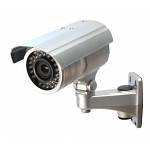
CCTV Camera
Aanduiding van een camera bestemd voor bewaking, beveiliging en preventie. Andere gebruikelijke benamingen zijn: bewakingscamera, CCTV camera, observatiecamera, publieke camera enzovoorts.
Er bestaan verschillende systemen, elk met hun voor- en nadelen. Afhankelijk van het belang dat u hecht aan die voor- en nadelen kunt u een keuze maken voor een bepaald systeem. We onderscheiden deze soorten:
1) Analoge camera's (CVBS, composiet video)
2) IP camera's (netwerk video)
3) HD-CVI camera's (analoog/digitaal, met resoluties tot 8MP
4) TVI camera's (analoog/digitaal, met resoluties tot 8MP
5) AHD camera's (analoog/digitaal, met resoluties tot 4MP
6) HD-SDI camera's (digitale video)
De beelden van al deze soorten camera's kunnen met PC, Laptop, Internet en Smartphone worden bekeken. Dit is dus absoluut geen eigenschap die alleen toebehoort aan IP camera's - het kan met alle systemen!!
Ik ga nu over elk type wat vertellen.
1) CVBS Analoge Camera's.
Deze bestaan het langst. Dit systeem bestaat al tientallen jaren. Tegenwoordig drukken we de resolutie van camera's uit in megapixel, en een traditionele analoge camera kun je vergelijken met een resolutie van ongeveer 0.4MP. De betrouwbaarheid is uitstekend, eenvoudig in aanleg en zeer voordelig in prijs. Simpel aan te sluiten met coaxkabel en 12V voedingskabel of met UTP netwerkbekabeling in combinatie met Baluns. Opnemen geschied met een DVR (digitale recorder met harde schijf) en de beelden kunt u zien op TV, Monitor, PC, Laptop, Tablet, Smartphone, Internet enz. Dahua producten zijn ook te gebruiken met CVBS systemen. De recorders zijn CVBS compatibel en de HD-CVI camera's kunnen ook ingesteld worden zodat ze een CVBS signaal afgeven.
2) IP Bewakingscamera's
Deze zijn direct aangesloten op een recorder (NVR) met PoE poorten, of op het netwerk (Router, Switch), met netwerkbekabeling of soms via WIFI. Deze techniek is veel complexer en vraagt meer aandacht bij installatie en onderhoud. Er zijn veel verschillen in protocol en het ene werkt lang niet altijd met het ander. De introductie van een overkoepelend protocol (ONVIF) heeft wel enige verbetering gebracht maar er zijn nog steeds veel problemen. De keuze in camera's is vaak minder en de prijzen liggen veel hoger. De scherpte in megapixels varieert van 1MP tot 5MP, uitzonderingen daargelaten. Door toegepaste compressie en andere netwerkperikelen ontstaan er problemen met de scherpte bij beweging en de verversingssnelheid (beeld hakkelt). Hoe meer camera's er in het netwerk zijn, des te meer problemen er kunnen ontstaan. Voor de opname is een netwerkrecorder (NVR) nodig of NAS. Het kan ook met een PC of Laptop, maar die moet dan wel dag&nacht aanstaan. Sommige IP camera's hebben een slot voor een SD kaart waar de opnames op kunnen worden vastgelegd.
Klik hier voor onze IP beveiligingscamera's
3) HD-CVI Bewakingscamera's.
Dit is het meest recente systeem en is beschikbaar sinds 2014. Het is soort mix tussen Analoog en HD-SDI en is uitgevonden door Dahua. Het is net zo makkelijk aan te leggen als Analoge camera's, dezelfde bekabeling kan worden gebruikt (Coax of UTP/Baluns). Camera's zijn verkrijgbaar in resoluties van 1MP, 2MP, 4MP en 8MP (4K). Opnemen geschied met een HD-CVI recorder (speciale digitale recorder met harde schijf) en de beelden kunt u zien op TV, Monitor, PC, Laptop, Tablet, Smartphone, Internet enz.
Het videosignaaltransport van camera naar recorder is zonder compressie. Er is geen probleem met bandbreedte of hakkelende blokkerig beelden zoals bij IP vaak het geval is. De live beelden op de monitor zijn zonder vertraging, zonder hakkelen, en zeer scherp zonder vlekkerigheden. Het is beter dan IP. Er zijn ook geen lastige configuraties, het is echt Plug&Play. Vanzelfsprekend kunt u de beelden op uw smartphone krijgen, dat is een functie van de recorder. Voor nieuw aan te leggen systemen heeft HD-CVI verreweg de voorkeur. Het is technisch zeer goed, het is betaalbaar en betrouwbaar.
Klik hier voor onze HD-CVI beveiligingscamera's
4) TVI is vergelijkbaar met HD-CVI. Het is uitgevonden door Hikvision, als antwoord op het HD-CVI systeem van Dahua. Vanaf 2017 zijn veel Dahua producten ook te gebruiken met TVI systemen. De recorders zijn CVBS/TVI/AHD compatibel en de camera's kunnen ook ingesteld worden zodat ze een CVBS/TVI/AHD signaal afgeven.
5) AHD is enigzins vergelijkbaar met HD-CVI. We zien AHD vooral bij merkloze Chinese beveligingscamera's. De prijs is vaak lager, maar de kwaliteit is ook minder. Vanaf 2017 zijn veel Dahua producten ook te gebruiken met AHD systemen. De recorders zijn CVBS/TVI/AHD compatibel en de camera's kunnen ook ingesteld worden zodat ze een CVBS/TVI/AHD signaal afgeven.
6) HD-SDI bewakingscamera's
In de camerabewaking zagen we dit type vanaf ~2010 en is min of meer uitgestorven. Het is een perfect en compromisloos systeem met een resolutie van 2MP. De beelden zijn hagelscherp. De camera's worden aangesloten met coax en 12V voeding. Er is geen vertraging in de beelden, de kleuren zijn briljant, geen compressie dus geen verlies van scherpte. Deze techniek bestaat weliswaar al van ver voor 2010, maar werd aanvankelijk alleen in TV studio's gebruikt. Sinds de introductie van HD-CVI in en vergelijkbare systemen in 2014, heeft HD-SDI geen bestaansrecht voor toepassingen als beveiligingscamera.

Securitynews
"Beveiligingsnieuws" is an interesting dutch website that brings daily news about all aspects of security.
Link to website Beveiligingsnieuws.
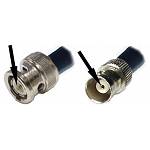
BNC Connector
This type of connector is used with CCTV cameras and takes care of the transport of the video signal. The connector has a lock, to prevent it from unintentional disconnecting.
There are many different types of video signal, none of them directly compatible.
- CVBS or composite video. This is the oldest system. This type of signal was quite common in consumer devices, typically using yellow RCA or SCART connectors
- HD-SDI video. This is professional system and used in the broadcast industry such as TV studios and so on. It handles Full HD and even 4K (8MP). It has been used in security CCTV as well, but it has overwon by HD-CVI which has a much better pricing and same resolutions.
- HD-CVI, HDCVI or CVI in short. This system, invented by Dahua, is in use since 2014. HD-CVI has various megapixel resolutions, from 1MP, 2MP, 4MP, 5MP, 6MP, uo to 8MP (4K).
- HD-TVI, HDTVI or TVI in short. This system, invented by Hikvision, is in use since 2015. Image quality comparable to HD-CVI but slightly less accepted by the market. TVI video also has various megapixel resoluties, from 1MP, 2MP, 4MP, 5MP, 6MP up to 8MP (4K).
- HD-AHD or AHD in short. This system is in use since the end of 2014. It is mainly used by small Chinese brands or no-name manufacturers. Price is often lower but the overall quality is also lower compared to market leaders such as Dahua and Hikvision. Having said that, most recorders from Dahua also accept AHD cameras and most Dahua cameras can be set to AHD, for maximum compatibility with other systems.
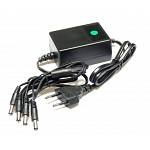
Power Supply For Cameras
Each camera needs power. The most common voltages used are:
- 12V DC for CCD and infrared cameras
- 6-9V DC for cheap CMOS cameras
- 24V AC for motorized pan/tilt cameras
- Each camera uses a dedicated 12V power adapter
- A central power supply for all cameras
- A combination of both
Click here to see our offers on power supplies.
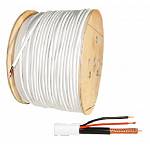
Siamese Cable
There are several ways of connecting your CCTV cameras, this applies to HD-CVI and old school CVBS or analog cameras:
- Siamese cable RG59 + 12V
- Ordinairy RG59 coax cable and 12V power adapter nearby
- UTP (network cable) combined with baluns
Siamese cable consists of a RG59 coax cable and 12V power cable. The power supply is done at the meeting point of all cables.
We also have finished siamese cables, simply plug and play. Available in lengths of 5, 10, 15 and 20 meters. You can extend these cables using a cheap BNC female-female adapter.
Click here for our cable products.
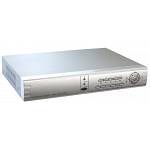
HD-CVI Digital Recorder
A digital recorder is needed to record all your HD-CVI cameras. On the rear of the unit you find 4, 8, or 16 inputs, for simultaneous recording of all cameras. The video is stored on a hard drive. You can enable a motion detection for each camera and record only when there is some sort of activity. A storage capacity of 1TB is a good choice for a 4 channel recorder. When you use cameras of 4MP or more, you may want to choose a larger capacity.
The connections on the rear are in BNC female. Power for the camera is also supplied by the cable. For HD-CVI you can use combicoax or UTP (network) cable combined with baluns.
The recorder has outputs for a monitor or TV. These outputs are in VGA of HDMI. Only a few models also provide a composite CVBS analog video output in BNC or RCA. Such output can be used for analog monitors or ordinary TV with the usual yellow RCA input. But VGA en HDMI is usual choice today. HDMI is preferred since it gives the best image quality, but cable length is limited to 10-15 meters. VGA goed up to 20 meter, max 30 meter. Larger distances are possible but require special extenders.
All recorders are supplied with a network connection. Hooking it up to the network makes it easy to see the cameras on PC, tablet or smartphone. Watch live video or browse through recordings made. No need for special accounts, it is all free and easy to setup. If needed we will gladly help you setting up your phone.
Click here for our recording products.
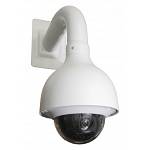
Pan Tilt Zoom PTZ
Er zijn ook motorisch bestuurbare (PTZ) camera's. PTZ is de afkorting van Pan-Tilt-Zoom wat staat voor 'heen-en-weer', 'op-en-neer' en optisch in- en uitzoomen. Dit kunt u doen met een stuurknuppel, bediening op via de recorder, of via de app op uw smartphone. Sporadisch zijn er ook nog camera's die alleen Pan en Tilt doen, dus geen zoomfunctie hebben. De correcte benaming is dan PT camera.
Het signaal waarmee PTZ camera's bediend worden noemen we RS485/PelcoD. Er zijn meer varianten, maar dit is de meest gebruikte. Bij oudere PTZ camera's zoals de analoge CVBS modellen, is een aparte kabel nodig voor dit stuursignaal. Bij de moderne HD-CVI camera's is dit signaal gecombineerd met het video en is geen extra draad meer nodig.
Wilt u een stuurknuppel of joystick aansluiten, dan kunt kiezen voor een Dahua PTZ controller die via het netwerk verbinding zoekt met de recorder en de daarop aangesloten HD-CVI PTZ camera's. We hebben ook goedkopere merkloze stuurknuppels, maar deze dient u wel met een aparte kabel aan te sluiten op de PTZ camera's.
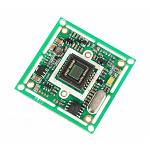
Image Sensor
Every camera uses an image sensor. There are several sizes used:
- 1/4 inch (very common)
- 1/3 inch (very common)
- 1/2 inch (very rare)
Through the years these sensors have become smaller and smaller. The biggest advantage was the reduction in lens dimensions, which also made cameras cheaper to manufacture. Practically this means that today we only see 1/4 inch en 1/3 inch sensors used.
Using the same lens, a 1/3 inch sensor compared to a 1/4 sensor gives a wider image, with a greater angle of view. Of course this also works the other way round. If you want the maximum of effective zoom you better use a camera with a 1/4 inch sensor. On the other hand, a 1/3 sensor has the advantage that there is more light sensitive material, which is why 1/3 tend to give a slightly better image quality in particular under low light conditions.
If you want to know it exactly, try our lenscalculator.
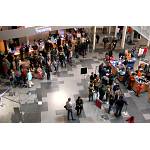
See everything
Customer often ask for a camera with a wide angle lens. After all, they want to see as much as possible. That is a wish we can understand!
But..... did you know that...
Most cameras with their standard lens have a normal viewing angle. That is the most sensible choice for most situations. A wide angle lens or narrow angle lens are only needed in specific situations.
If you only want an overview as large as possible, without caring much about detail, a wide angle is what you need. If you only want to view a door opening from a greater distance, then a small angel lens (tele lens) is a good choice.
The bottomline... in most situations a standard camera/lens combination gives you the most satisfying results. If you want to see more, use more cameras to cover the area.
Monitor
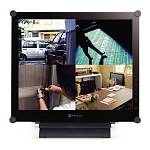
Een camerabewakingssysteem is natuurlijk niet compleet zonder monitor. Vanaf 2015 beschikken recorders in het algemeen over zowel een VGA aansluiten als een HDMI aansluiting. De traditionele CVBS of composiet videosignaal is heel soms nog aanwezig, maar is echt een uitzondering. Controleer dus specificaties van uw recorder als u een monitor gaat uitkiezen.
Goed om te weten:
- Een TV is bijna altijd geschikt. Op een moderne TV vindt u een HDMI ingang en vaak ook een VGA of composiet ingang.
- Een computer Monitor is VGA, soms ook HDMI, maar vrijwel nooit CVBS of composiet video!
- Een computer VGA monitor maakt u geschikt voor composiet videosignaal met behulp van een video/VGA converter
- Gebruik een monitor of TV in 3:4 (normaal) voor de traditionele CVBS camera's en 16:9 (breedbeeld) formaat voor modernere technieken als HD-CVI of NVR recorders.
Klik hier voor ons aanbod in monitoren.
Lux and Sensitivity
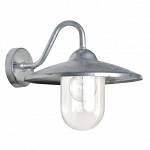
Camera sensitivity is expressed in lux. It's the minimum amount of light needed for acceptable results.
This table gives an indication of the amount of light:
A regular CCD camera has a sensitivity of 1 lux. That gives you even in a dusk setting usable images, with all the aspect of such a setting. Infrared cameras are often rated as 0 lux. This is correct, since the camera needs no other light apart from the infrared light it produces itself. However, the image sensor inside is still 1 lux.
Note that there are large differences in lux when you compare day (100.000 lux) and night (0.1 lux). This can be explained because we apply a logarithmic scale. The difference between 1 lux and 0,1 lux suggest a factor of 10x, but for us humans it is only a factor of 2. Do not focus too much on lux value alone. A camera of 1 lux or 0.8 lux makes no difference at all in practice. However, a factor 10, or 100, or 1000, yes that can make a difference indeed.

Instructie Filmpjes
Hier vindt u enkele instructievideo's...
Draadloos
Draadloze beveiligingscamera's, heel eerlijk, VideoFrank adviseert het niet. Om te beginnen, geheel draadloos zijn ze nooit. Er moet altijd nog een kabel voor de stroomvoorziening worden aangelegd. Maar dat is niet het ergste, vervelender is dat het zeer gebrekkig werkt.
Bereid u daarom voor op het volgende:
- Zeer grote kans op storing door andere draadloze apparaten
- Vandaag werkt het, morgen niet meer
- Continue strepen en flikkeringen in het beeld
- Helemaal geen beeld
Soms kan het werken. 10-15 meter, 1 muur of plafond, er zijn gevallen bekend waarin het zowaar werkte. Op het platteland, zonder buren, is de kans dat het kan werken ook groter. Maar een kabel werkt altijd! Voorkom teleustelling en gebruik alleen bekabelde beveiligingscamera's.

Software en Instructies
Bij recorders en IP camera's wordt meestal software bijgeleverd. Klik hier voor algemene software, manuals en installatie instructies.

Resolutie
Onder resolutie verstaan we het aantal beeldpunten waarmee een beeld is opgebouwd. Het verhaal is minder eenvoudig dan het lijkt. Meer is namelijk lang niet altijd beter. Er zijn een aantal standaardresoluties, we noemen er een paar:
- CIF (352 x 288) circa 0,1MP (zeer achterhaald)
- D1 (704x576) circa 0,4MP (traditioneel analoog, achterhaald)
- HD (1280x720) circa 720P of 1MP (enigzins achterhaald)
- 1080N (1080 x 960) circa 1MP (enigzins achterhaald)
- FULL HD (1920 x 1080) 1080P of 2MP (aanrader)
- UHD (3840 x 2160) of 8MP of 4K (aanrader)
Meer pixels niet altijd beter? Dat vraagt om extra uitleg. Meer pixels betekent meer detail, zou je zeggen. In situaties met veel licht, zoals overdag, is dat zeker zo. Maar in de nacht, wanneer u het meest op uw camera's rekent, kan dat voordeel ook een nadeel zijn. Meer pixels op een sensor, betekent dat die pixels ook kleiner zijn. En een kleinere pixel vangt minder licht. Het signaal moet meer versterkt worden en er ontstaat ruis. Er is in de camera vaak wel een ruisonderdrukking actief, maar die werkt op het principe van aangrenzende pixels samenvoegen en middelen. En daar gaat uw resolutie. In de nacht kan de effectieve resolutie wel met een factor 4 of meer afnemen. Duurdere camera's hebben daar wel minder last van. In het lagere segment geven 2MP camera's vaak een beter nachtbeeld dan de 4MP of 5MP modellen. De 8MP zijn wel weer beter, omdat die camera's een grotere beeldsensor gebruiken. In de meeste situaties zijn de Starlight 2MP camera's de beste keuze. Toch iets om bij stil te staan.
Meer megapixels geven dus niet altijd een beter beeld. De grootste winst maakt u door te kiezen voor een camera met verstelbare lens. Zoom de lens zover in dat u alleen dat stuk beeld overhoudt waar uw interesse naar uitgaat. Op die manier verspilt u geen pixels aan onbelangrijke details. Een groot stuk blauwe lucht is wel leuk voor een aantrekkelijk plaatje, maar richt de camera liever wat naar beneden, waar iets te zien is.
Stel de opname altijd in op de hoogst mogelijke kwaliteit die de camera levert. Besteed aandacht aan de scherpstelling van de camera, indien van toepassing. Het is werkelijk zonde als uw megapixel camera niet scherp staat afgesteld. Maak de lens/kap regelmatig schoon, want ook daar kunt u scherpte verliezen door vuil en aanslag.
Bovenstaande in aanmerking nemend, levert 2MP de meeste waar voor uw geld. Met name de supergevoelige Starlight camera's geven een prachtig beeld ook in de nacht. Wilt u toch meer, maak dan de stap naar 8MP. Daarmee komt u 2x zo ver, qua gelijke scherpte op afstand. De gouden tip is een camera met optische zoomlens, dan verspilt u geen pixels zoals bij een vaste lens met een te breed beeld vaak het geval is.

HD-CVI versus IP
Ok, VideoFrank is geen groot liefhebber van IP camera's en al helemaal niet van Wifi IP camera's. Waar komt deze aversie tegen IP vandaan?
Even kort door de bocht - HD-CVI is beter, goedkoper en vergt minder kennis bij het installeren.
Beter? - Ja. Door het ontbreken van een compressie processor in de camera, is er geen compressie ruis in het beeld. Dit ziet u direct in het live beeld op de aangesloten monitor. Het beeld is rotsvast en stabiel. Met uw neus op het scherm ziet u geen pixeltjes dansen zoals bij elke IP camera wel het geval is.
Beter? - Ja. Omdat er geen compressie ruis is, levert een camera van (bijvoorbeeld) 2 megapixel ook daadwerkelijk 2 megapixel aan bruikbaar beeld op. Een IP camera van 2 megapixel levert ook 2 megapixels aan beeld, maar door de compressie ruis is het plaatje kwalitatief toch stukken minder.
Goedkoper? - Ja. Omdat er in de camera geen compressie processor nodig is, zijn de productiekosten lager. Bij een gelijkblijvend budget krijgt u beter beeld voor uw investering!
Minder kennis nodig? - Ja. Bij IP en Wifi IP kunt u problemen ondervinden met de instellingen van de IP adressen, Wifi SSID instelling, gebruikersnaam en wachtwoord of compatibiliteitsproblemen met uw hardware en software.
HD-CVI dus. De aansluiting doet u met combicoax of met UTP netwerkkabel (en baluns) - net wat u wilt, of wat er al ligt - als het om een upgrade gaat. Resoluties tot 8MP, en uw recorder geeft de beelden - zonder merkbare vertraging - door, via netwerk/internet naar uw Smartphone, laptop, PC enzovoorts.
Natuurlijk zijn er uitzonderingen. Bij installaties waar u slechts 1 of 2 IP camera's wilt, is het overzichtelijker en kan IP toch voordeliger uitpakken. Er zijn ook IP camera's die zelfstandig opnemen op een Micro SD geheugenkaart - dat scheelt een recorder. Er zijn wel degelijk situaties denkbaar waarin IP een betere keuze is, maar minder vaak dan gedacht.
Video output in HDMI, VGA, or composiet video
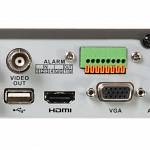
Elke recorder is voorzien van een aansluiting waarop u een monitor of TV kunt aansluiten. Er is minimaal één zo'n aansluiting aanwezig, maar soms 2 of meer. U bent niet verplicht een monitor aan te sluiten, omdat via Netwerk de beelden ook te zien zijn op uw PC, laptop, smartphone enzovoort. Maar vaak is een direct aangesloten monitor toch gewenst, vooral in winkels en kantoren.
We onderscheiden de volgende aansluitingen:
1) HDMI - is tegenwoordig de meest gebruikte aansluiting. Bijna altijd is er ook een VGA aansluiting aanwezig. HDMI omvat zowel beeld als geluid, en gaat tot resoluties van 4K (8 megapixel) en werkt met kabellengtes van 15 meter. Moet u een grotere afstand overbruggen, dan zijn er speciale converters. De signaaloverdracht is digitaal en het beeld is maximaal in kwaliteit.
2) VGA - Wordt ook heel veel gebruikt, herkenbaar aan de connector met de 15 pinnen in 3 rijen van 5. Vrijwel elke PC monitor heeft zo'n aansluiting. Over grotere lengtes (10 meter of meer) kan er wat kwaliteitverlies optreden. De maximaal redelijkerwijs te gebruiken kabel is 30 meter. Met een VGA extender kunt u grotere afstand overbruggen. De resolutie is maximaal 2MP, 1920x1080 pixels dus.
3) Composiet video - Dit wordt nog maar zelden gebruikt. De aansluiting is herkenbaar als BNC connector of een Gele RCA/tulp connector. De resolutie is ook erg laag en niet meer van deze tijd. Er zijn maar weinig recorders die deze aansluiting nog hebben, soms bij de heel uitgebreide recorders komt het nog weleens voor. Het signaal wordt met coaxkabel overgebracht, de afstand kan daarbij honderden meters zijn.

Overstappen van IP camera's naar HD-CVI camera's
Overstappen van IP-Camera's naar HD-CVI ?
1 - Om HD-CVI camera's te kunnen gebruiken, heeft u allereerst een HD-CVI recorder nodig. Bestelt ook een harde schijf, die wij dan voor u inbouwen.
2 - U kunt de bestaande netwerkkabel handhaven. Met een balun set, maakt u de kabel geschikt voor HD-CVI. Aan elke kant plaatst u een balun. Die past aan de camera zijde direct op de camera. Bij de recorder sluit u deze aan op de recorder en op een 12V voeding.
3 - U heeft dus ook een 12V voeding nodig. Plaats deze bij de recorder en sluit die aan op de balun die op de kabel naar de camera zit.
Uw HD-CVI recorder kan evengoed nog overweg met IP camera's. Kwestie van aanmelden op de recorder met IP adres en inlognaam en wachtwoord. U hoeft bij een overstap dus niet direct al uw IP camera's te vervangen.
Bij HD-CVI camera's is het aansluiten voldoende. Alle intelligente functies regelt u via de recorder. Met uw smartphone maakt u verbinding met uw recorder en zijn alle camera's zichtbaar. De app voorziet ook in pushmeldingen (bij o.a. beweging) en natuurlijk terugzoeken in gemaakte opnames.
